
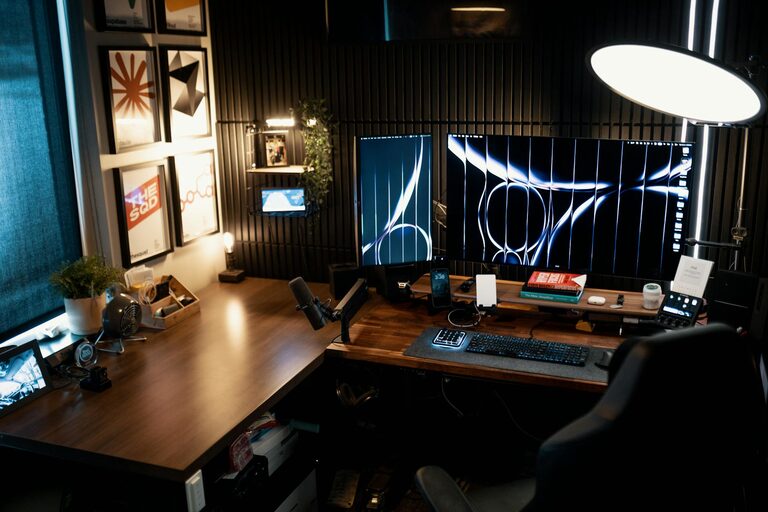
Creating a home workspace that balances comfort and productivity is key to working efficiently while feeling relaxed and focused. Whether you are working remotely full-time, freelancing, or just need a dedicated spot for occasional tasks, setting up a cozy and practical area can make a big difference.
Below are some essential tips to help you design a home office space that supports your work and wellbeing.
1. Choose the Right Location
Finding the best spot in your home is the first step. Ideally, your workspace should be:
– Quiet and free of distractions: Look for a low-traffic area away from household noise.
– Near natural light: Position your desk close to a window if possible to improve mood and reduce eye strain.
– Separate from relaxation areas: Try to avoid working in bedrooms or lounges to create a clear boundary between work and rest.
If space is limited, consider using room dividers, screens, or curtains to visually separate your work zone.
2. Invest in Comfortable Furniture
Comfort is essential to maintain productivity and avoid fatigue.
– Ergonomic chair: Choose a chair that supports your back and allows your feet to rest flat on the floor.
– Proper desk height: Your desk should enable your arms to rest comfortably with elbows at a 90-degree angle.
– Adjustable options: Standing desks or adjustable chairs can help you change positions throughout the day.
Adding cushions or supportive accessories can enhance comfort further.
3. Optimize Lighting
Good lighting helps reduce eye strain and keeps you alert.
– Natural light: Maximize daylight by keeping windows unobstructed.
– Task lighting: Use a desk lamp with adjustable brightness and direction to focus light on your work.
– Avoid glare: Position screens perpendicular to windows and use blinds to control sunlight.
Warm-toned bulbs can create a cozy atmosphere, while cooler tones help increase focus.
4. Keep It Organized and Clutter-Free
An organized workspace helps maintain concentration and efficiency.
– Storage solutions: Utilize shelves, drawers, or filing cabinets to store supplies and documents.
– Desk organizers: Keep pens, notebooks, and gadgets neatly arranged.
– Minimize distractions: Only keep tools and items relevant to your current tasks on your desk.
Schedule regular tidy-up sessions to prevent clutter buildup.
5. Personalize Your Space
Adding personal touches can make your workspace more inviting and reduce stress.
– Decor: Incorporate artwork, photos, or plants to brighten your area.
– Color scheme: Choose soothing or inspiring colors based on your preferences.
– Comfort items: A soft blanket, cushions, or a footrest enhance coziness.
However, avoid overdecorating, which could lead to distractions.
6. Use Technology Wisely
Equip your workspace with the right technology to streamline your work.
– Reliable internet connection: Use wired connections or a strong Wi-Fi signal.
– Quality peripherals: Invest in a good keyboard, mouse, and headset.
– Cable management: Use clips or sleeves to keep cords neat and prevent tangles.
Keep software updated and organize digital files for easy access.
7. Incorporate Healthy Habits
Your workspace should support both comfort and health.
– Regular breaks: Use timers to remind yourself to stand, stretch, or rest your eyes periodically.
– Hydration: Keep a water bottle nearby to stay hydrated.
– Air quality: Open windows or use air purifiers to maintain fresh air circulation.
Consider adding a small indoor plant to improve air quality and add greenery.
Conclusion
Designing a cozy and productive home workspace is about balancing comfort, function, and atmosphere. By thoughtfully choosing your location, investing in supportive furniture, managing lighting and organization, personalizing your setup, and embracing healthy habits, you can create an environment that helps you work effectively while feeling relaxed and inspired.
Start small, make adjustments as needed, and enjoy the benefits of a workspace tailored to your needs.
About the Author